OpenAI Computer History Turns Desktop Activity Into Agent Memory

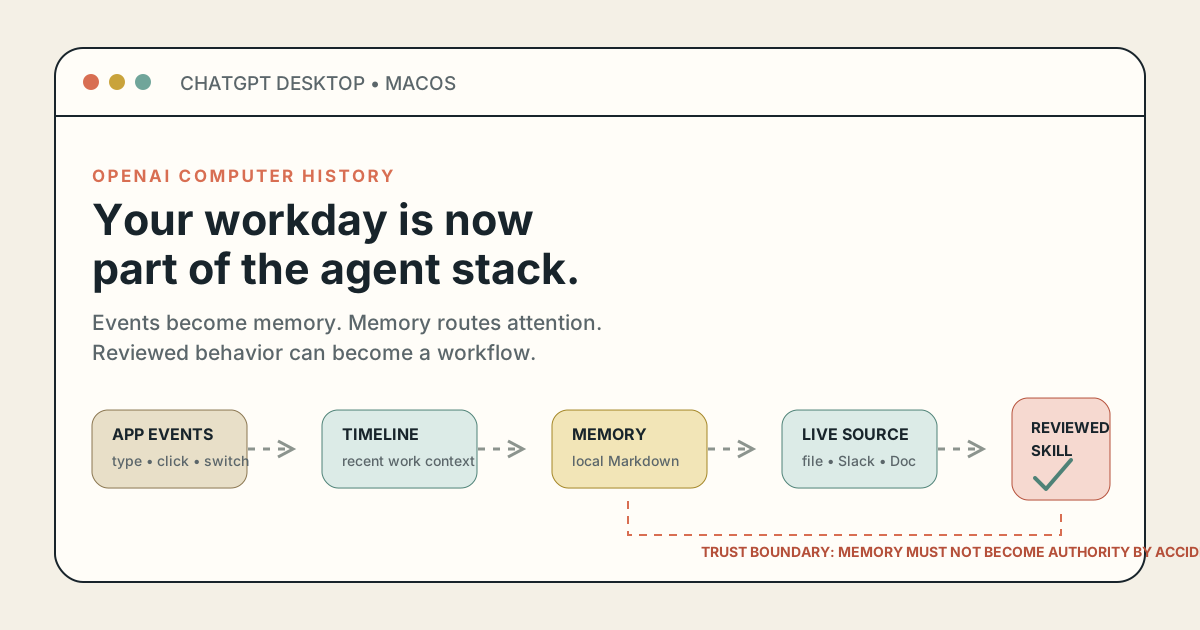
OpenAI has given ChatGPT and Codex a way to remember work that never happened inside a chat or a repository.
Computer History, launched on August 13, records interaction events from allowed Mac apps and websites, turns them into a timeline and local memories, and lets ChatGPT or Codex use that history later. The easy comparison is “Microsoft Recall without screenshots.” That misses the important part.
This is not primarily a search box for your past. It is a new context layer for agents.
The system can notice that you moved between a project brief, Slack feedback, a code editor, and a launch checklist. Later, it can use that trail to find the live sources, reconstruct where you stopped, or suggest that a repeated sequence should become a skill or automation. Desktop activity has moved from something the human remembers into something the agent can route on—and, with review, turn into procedure.
That is useful. It also creates a longer trust chain. An allowed webpage can influence an event stream. The stream can become a local Markdown memory. That memory can enter a future agent session. A repeated pattern can become a proposed workflow. The original content may be gone by the time its effect appears.
OpenAI removed Chronicle’s screenshot capture, but it did not remove the privacy or security problem. It changed the data from pixels into structured behavioral context. Builders and administrators should judge Computer History by the controls around that whole pipeline, not by the reassuring absence of screen recordings.
OpenAI’s August 13 changelog and Computer History documentation say the feature is off by default in the ChatGPT desktop app on macOS. Pro users can opt in. Business and Enterprise administrators must first grant access by workspace role, but that permission does not activate collection for a member; every user still chooses whether to turn it on.
The first release excludes the European Economic Area, Switzerland, and the United Kingdom. OpenAI gives no public reason for those regional limits, so attributing them to a specific law would be speculation. The feature also requires Memories and does not work with an API key or Amazon Bedrock. Product teams cannot embed this collector by calling a new endpoint.
Once enabled, Computer History can create events from clicks, typing, keyboard shortcuts, app switches, and context exposed through macOS accessibility. Users choose the apps and website URLs that may contribute, can use include-only or exclude lists, and can pause collection from the menu bar. OpenAI says private-mode browsing is not included.
The launch page contains no efficacy benchmark. There is no published number for task-resumption accuracy, correct-source retrieval, false workflow suggestions, event volume, summarization latency, injection resistance, or tokens consumed per hour. OpenAI has documented the architecture and controls; it has not yet established how reliably the product improves work.
Computer History replaces the earlier Chronicle research preview. OpenAI is unusually direct about the distinction: Chronicle used screenshots; the rebuilt feature records interaction events and does not capture screenshots, screen recordings, microphone input, or system audio. It does not require Screen Recording permission.
That is a meaningful architectural change. It should not be simplified into “less surveillance.”
A screenshot captures a wide, messy visual field. It can accidentally include a notification, a secret in another pane, or content unrelated to the task. Structured events can reduce that incidental pixel collection and avoid OCR noise. But events such as typing, application switches, URLs, focus changes, and accessibility labels can form a cleaner account of behavior. Cleaner data is often easier to search, summarize, and connect across applications.
The privacy question is therefore not whether one architecture contains fewer pixels. It is which fields are recorded, what redaction exists, how integrity is protected, who can retrieve the derived state, and how long each form survives. OpenAI does not publish an exact per-application event schema, supported browser matrix, secure-text-field behavior, or collection cadence.
| Layer | Documented behavior | What teams still need to establish | Operational control |
|---|---|---|---|
| Capture | Events from allowed apps and sites; no screenshots or audio | Exact fields, browser coverage, redaction, volume | Start with include-only sources |
| Temporary state | Event files in the ChatGPT App Group for up to 48 hours | Failure-path logs, backups, crash reports, derived metadata | Test deletion and endpoint handling |
| Summarization | Ephemeral Codex session processes events on OpenAI servers | Model, interval, token load, measurable error rate | Monitor quota and sample summaries |
| Persistent state | Local, plain-text Markdown memories remain until cleared | Integrity, versioning, backup and sync exposure | Treat the directory as sensitive generated state |
| Later use | Relevant memory or events may enter ChatGPT or Codex context | Provenance, stale-context rate, downstream action risk | Keep authority and approval outside memory |
The difference also matters for historical comparisons. Contemporaneous Help Net Security coverage and The Register’s critique describe Chronicle’s screenshot-era behavior. Those reports are useful context, not a security audit of the rebuilt product. A reported six-hour screenshot window and today’s 48-hour event window do not measure equivalent data.
“Stored locally” and “not used for training” are both true in limited ways. Neither describes the complete lifecycle.
OpenAI says temporary events live locally in the ChatGPT App Group for up to 48 hours. Computer History periodically starts an ephemeral Codex session with access to that stream, and OpenAI processes the event files on its servers to generate memories. The company says it does not retain those event files after processing unless required by law and does not use them for training.
The generated memories return to the Mac as readable Markdown under $CODEX_HOME/memories/extensions/skysight/, typically ~/.codex/memories/extensions/skysight/. They remain until the user deletes the associated item or clears history. Computer History does not encrypt those files itself, and OpenAI warns that other programs running as the same macOS user may be able to read them. Full-disk encryption such as FileVault can still protect data at rest; it is simply a different layer.
Later, when ChatGPT or Codex uses a memory, relevant memory content and interaction events may be included in the chat context. For consumer chats, that content may be used to improve models if the account’s ChatGPT data controls allow it.
So a serious policy needs four answers:
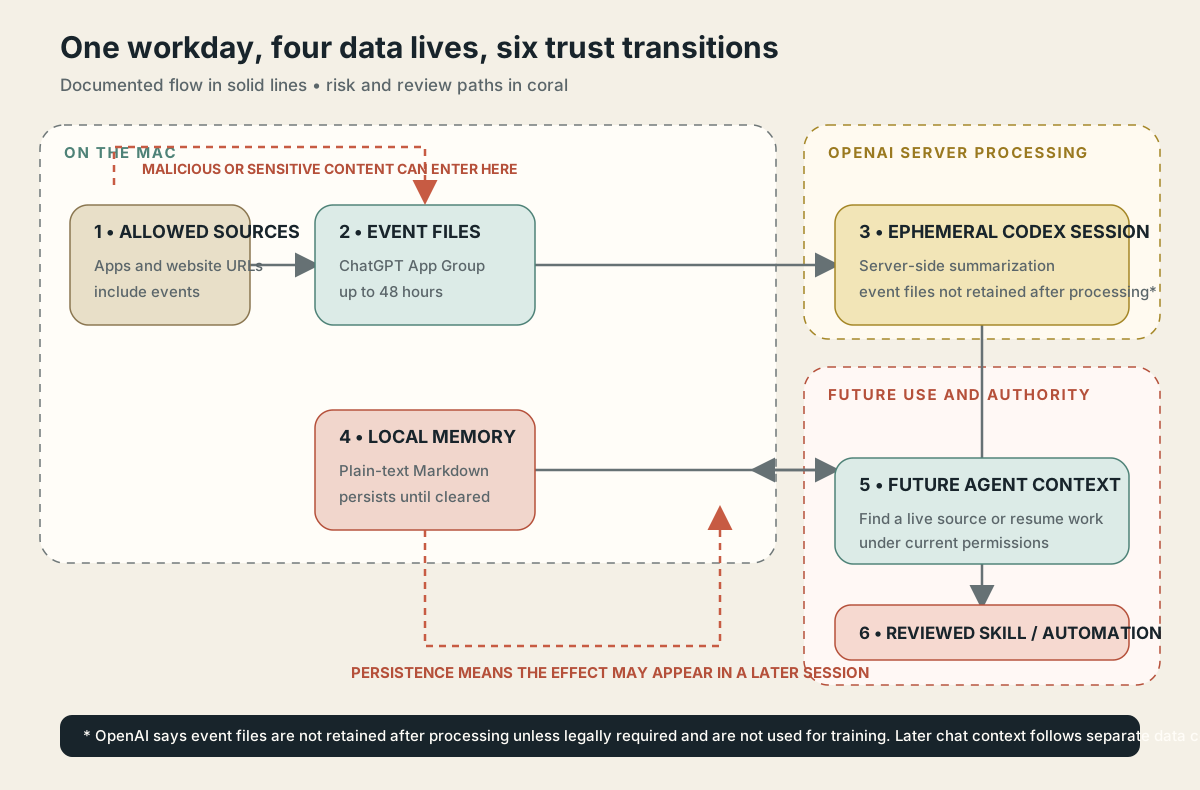
Computer History crosses local and server boundaries more than once. The risky transition is not only capture; it is promotion from observed content into durable context and then into a proposed workflow.
This layered model is the first non-obvious implication of the launch: data-use promises have to be evaluated by stage. A policy that stops at “raw events are not trained on” leaves later memory reuse ungoverned. A deletion test that removes the temporary event but misses the generated memory is incomplete. An allowlist that changes future capture does not delete old history; OpenAI explicitly says users must delete or clear existing items separately.
OpenAI’s own examples suggest that Computer History is designed less as a forensic record than as an index into current work. A user can ask where a proposal went or what happened before a break. The timeline identifies a file, Slack conversation, Google Doc, or other source, and the agent can then read that source directly.
That is a better architecture than treating yesterday’s summary as truth.
A memory that says “feedback arrived on the launch brief” will become stale. The linked Slack thread or Doc can carry the latest comments, timestamps, permissions, and resolution. History provides the address; the source supplies the evidence. The design could reduce hallucination when agents use it that way.
It also creates a discovery graph across applications. An agent that otherwise knew only about the current repository may learn that a sensitive customer thread, financial sheet, or personal message exists and where to fetch it. Source recovery improves usefulness by expanding what the agent can locate. That same expansion increases the importance of source permissions at retrieval time.
The right retrieval rule is:
history suggests a source
source permissions are checked now
live source is read
claims cite that source
memory is never treated as authority
This follows OpenAI’s broader Codex Memories guidance: required team rules belong in AGENTS.md or checked-in documentation, while memory remains a recall layer. Compliance policy, deployment runbooks, customer commitments, and irreversible instructions should not live only in generated Markdown.
The most ambitious feature is easy to overlook. When Computer History notices repeated work, a timeline item can suggest a skill or automation. The user reviews the suggestion and can ask Codex to create it from the observed sequence.
Nothing executes automatically at that point. Still, the conceptual jump is large:
human behavior -> event sequence -> summary -> reusable procedure
Most automation products ask a person to specify a workflow. Computer History can infer one from demonstration. That can turn a morning release routine, a support triage pattern, or a recurring research loop into a reusable agent artifact without the user first writing a formal process.
The catch is that observed behavior is not the same as approved policy. A human may take a shortcut once, paste a temporary token, visit the wrong environment, work around a broken check, or follow a malicious instruction embedded in a page. Repetition proves frequency, not safety.
Our earlier analysis of Agent Plugins 1.0 argued that portable capabilities do not carry portable trust. Computer History adds a step before portability: the agent can now propose the capability by watching the user. That proposal needs a provenance receipt showing the event window, contributing sources, generated files, requested permissions, owner, test results, and rollback path.
OpenAI explicitly warns that content in allowed apps and websites can contain malicious instructions that ChatGPT or Codex might follow. That warning should be read together with persistence.
Traditional indirect prompt injection is often framed as an immediate event: an agent reads a hostile page, mistakes its text for instructions, and takes an action. Computer History adds delayed paths. Hostile content may influence a summary or memory, which can then appear in a later session after the original page has closed. If a proposed workflow is generated from the contaminated sequence, the effect can become more durable still.
Two recent preprints help define the threat without proving a vulnerability in this product. The MPBench paper maps structural memory-poisoning channels and the tension between aggressive memory use and security. The Bad Memory evaluation reports that payloads already planted in persistent memory files could affect current and future Claude Code and OpenAI Codex sessions in its sandboxed tests. Neither paper audited Computer History’s new event-ingestion pipeline.
That caveat matters. The defensible conclusion is not “Computer History has been hacked.” It is that persistent agent memory is a known attack surface, OpenAI acknowledges indirect prompt injection, and the product creates a new ingestion path into that memory.
Protect the local directory for integrity as well as confidentiality. OpenAI documents that same-user processes may read generated memories and that users can modify the Markdown. It does not say those files are authenticated, checksummed, versioned, or tamper-evident. Another process altering them is a plausible threat model that needs endpoint testing, not a confirmed exploit.
Business and Enterprise administrators can decide which roles may access Computer History. That is a useful consent gate. Based on the public feature page, it is not yet a full policy surface for managing desktop history.
OpenAI publicly documents user-level include and exclude lists, pause controls, history review, deletion windows, and admin entitlement. It does not describe centrally enforced app or URL policies, sensitive-information filtering, managed retention, Computer History-specific audit events, memory encryption, tamper protection, legal-hold behavior, or DLP integration. “Not publicly documented” is the relevant claim; absence from one page does not prove no internal or adjacent control exists.
Microsoft Recall offers a useful control comparison, although it is a different system. Microsoft’s enterprise Recall documentation describes encrypted snapshot storage, Windows Hello and TPM-backed key protection, storage and retention policy, app and website filtering, sensitive-information filtering, and DLP integration. Purview documentation adds audit and policy behavior.
That does not make Recall universally safer. Recall captures encrypted screen snapshots and analyzes them locally; Computer History captures structured events, sends temporary files for remote summarization, and stores derived Markdown locally. Different inputs, processing, and storage produce different failure modes. The comparison establishes a visible enterprise governance baseline, not a winner.
My expectation is that OpenAI will add centrally managed source policy, usage visibility, DLP or sensitivity controls, richer provenance, and stronger local-memory protection before regulated organizations deploy Computer History broadly. The regional exclusions make that product work more likely, but OpenAI has announced no roadmap.
Computer History consumes tokens while it summarizes activity and creates memories. OpenAI publishes no model name, interval, per-event rate, typical daily consumption, or worked cost example.
That changes the economics of agent memory. A foreground prompt has a visible intent: the user asked for work. Background summarization spends quota before anyone knows whether a memory will become useful. The correct metric is not subscription price or memories generated. It is useful recoveries, correct source resolutions, and accepted workflows per token.
This extends the cost-graph argument in our ChatGPT Enterprise rate-card analysis. Measure Computer History separately from foreground Codex work:
captured hours
events and memories created
background tokens consumed
useful history answers
correct live sources recovered
workflow suggestions reviewed
automations accepted
false or stale memories
If a pilot creates hundreds of summaries but rarely changes an outcome, the memory system is generating activity, not leverage. OpenAI’s general Memories docs say background generation can skip a pass near a configured rate-limit threshold, which is sensible. Administrators still need feature-level usage telemetry to distinguish deliberate foreground work from passive context spend.
The durable shift is not “ChatGPT remembers more.” It is that the agent stack now has a cross-application attention layer.
We saw an earlier version inside the editor when VS Code added agent-host session infrastructure. Computer History widens the aperture from repository and editor state to the work surrounding them: conversations, briefs, tabs, task lists, and handoffs.
That leads to three predictions.
The highest-value use will be reopening the right live artifact and resuming work, not producing an exhaustive diary. Fresh sources are easier to verify than compressed behavioral summaries.
Skills proposed from observed activity will need source windows, diffs, permissions, tests, ownership, and rollback. Without that chain, learned automation will be difficult to trust or audit.
Regulated adoption will depend on managed allowlists, DLP, audit evidence, retention, local-memory protection, and deletion guarantees more than clever summaries.
There is a broader product implication. As agents gain browser access, computer use, connectors, memory, and learned workflows, context is no longer passive text. It becomes a route to authority. The system must keep three questions separate: what the agent may observe, what it may remember, and what it may do. Computer History addresses the first two with user controls. The host and organization still own the third.
Do not begin by enabling broad collection for an entire company. Start with a small, non-regulated cohort and a narrow use case such as source recovery for project work. Use include-only lists, test the lifecycle, and define a stop condition before collection begins.
The pilot should compare Computer History against a cheap baseline: a user-written end-of-day note, a checked-in task log, or explicit project memory. If automated capture cannot beat that baseline on recovery time and correctness, the added trust surface is not justified.
Computer History is an opt-in feature in the ChatGPT desktop app for macOS. It turns activity events from allowed apps and websites into a timeline and local memories that ChatGPT and Codex can reference. It can also suggest skills or automations from repeated workflows.
OpenAI says no. The rebuilt system records interaction events such as clicks, typing, keyboard shortcuts, app switches, and macOS accessibility context. It does not capture screenshots, screen recordings, microphone input, or system audio, and it does not require Screen Recording permission.
No. Temporary events are stored locally, but OpenAI says ephemeral Codex sessions process event files on its servers to create memories. OpenAI says it does not retain those event files after processing unless legally required and does not use them for training. The generated Markdown memories are stored locally.
Temporary event files remain for up to 48 hours. Generated local memories remain until the user deletes an item or clears history. Changing an app or website exclusion only changes future capture; it does not remove previously created history.
No. The initial feature ships in the macOS ChatGPT desktop app for eligible ChatGPT plans. OpenAI says it is unavailable with API keys and Amazon Bedrock, and it has not announced a programmable capture API.
No. Recall uses locally analyzed, encrypted screen snapshots on supported Windows PCs. Computer History uses structured interaction events, remote summarization in ephemeral Codex sessions, and local Markdown memories. They solve overlapping recall problems through different data and trust architectures.
Only for a narrow, measurable use case after reviewing consent, source permissions, local-memory handling, data controls, token cost, prompt injection, and deletion. A cautious include-only pilot is more defensible than broad capture with a short blocklist.
Computer History could solve one of the most irritating problems in agent work: the context that matters is scattered everywhere, while the agent usually sees only the current chat and repository. Letting Codex recover the right source and resume a cross-app task can remove hours of reconstruction.
The feature is more consequential because it does not stop at recall. It can identify repeatable work and help turn it into a skill or automation. That makes desktop history a potential bridge from human behavior to executable agent procedure.
The bridge needs gates.
Event capture is narrower than screenshots, but structured behavioral data is still sensitive. Local memory is inspectable, but not encrypted by the feature. Raw events are excluded from training, but later chat context follows separate controls. Admin access exists, but the public enterprise policy layer is still thin. Prompt injection is acknowledged, while the durable-memory path is largely unbenchmarked.
OpenAI has built an attention layer that can make agents much better at re-entering work. The teams that benefit will treat it as generated, untrusted context: useful for locating evidence, never authoritative by itself, and never sufficient permission to act.
That is the right standard for agent memory. Remember broadly, verify at the source, and authorize narrowly.