Cohere’s North Micro Vision Gives Documents Their Pixels Back

Small vision-language models usually arrive with the same promise: enough visual intelligence to run locally, cheaply, and close to the data. Cohere Labs’ new North Micro Vision Instruct is more specific—and more useful—than that pitch.
The 2.4B-parameter Apache-2.0 model has been trained to preserve a full A4 page at 200 dpi, then read, ground, and structure what is on it. Its curriculum leans heavily toward OCR, charts, tables, and document questions. Its strongest vendor-reported results cluster around DocVQA and visual grounding. This is a compact model built around the page, not a miniature chatbot that happens to accept images.
That distinction changes the deployment decision. North’s native-resolution design can keep small type, table geometry, and labels visible instead of crushing every page into a thumbnail. But every preserved pixel becomes part of the compute bill. A dense page can consume thousands of visual tokens before the prompt begins, and the model’s validated multimodal window is 8K—not the 128K number attached to its language backbone.
The launch is also lopsided in an instructive way. Fine-tuning recipes and Apple-silicon quantizations appeared immediately, while stable Transformers packaging and public vLLM support lagged behind. North is ready to customize before it is easy to serve.
The useful way to read this release is not “another tiny VLM.” It is a commercially permissive document-perception layer that builders must finish turning into a product.
Cohere released North Micro Vision Instruct on August 12, calling it the company’s smallest VLM so far. The model combines a custom-trained 400M vision encoder, initialized from SigLIP 2 SO400M, with a 2B North Micro language model. The BF16 weights are about 4.97 GB, and the repository is licensed under Apache 2.0.
Those are attractive numbers for local deployment, but they do not explain why North exists. The training recipe does.
According to Cohere’s technical launch post, the vision-language alignment moved through three resolution stages:
| Stage | Resolution | Examples | What changed |
|---|---|---|---|
| Alignment 1 | 384 × 384 | 10 million | Vision encoder and projector trained; language model frozen |
| Alignment 2.1 | 1024 × 1024 | 13 million | Vision, projector, and language model trained together |
| Alignment 2.2 | Up to 1654 × 2339 | 10 million | Native A4 page at 200 dpi, preserving aspect ratio |
That was followed by 50 million instruction examples and 500,000 preference examples. In the instruction stage, native OCR, charts and tables, grounding and counting, and OCR question answering made up 62.2% of the disclosed mixture. The economic target is hard to miss: invoices, forms, claims, catalogs, archives, diagrams, and reports.
The architecture supports that focus. The released configuration uses 16-pixel vision patches, spatial merging, 2D rotary position information, and a DeepStack-style path that injects features from several vision layers into early language-model layers. The 28-layer language model alternates three local 4,096-token attention layers with one global-attention layer.
In plain English: the model tries to retain where visual evidence sits on the page without making every language layer pay full global-attention cost.
“Native resolution” sounds like an image-quality feature. In production it behaves like a resource-control feature.
At North’s published maximum, an A4 page contains roughly 3.87 million pixels. Based on the released 16-pixel patch and spatial-merge configuration, that implies around 3,800 merged visual positions before text and generated output. That is a RohitAI estimate from the configuration, not a number Cohere publishes as a billing contract, but it explains the constraint: a single detailed page can occupy a large share of the validated 8K multimodal window.
Add a second page, a long prompt, and a generous answer budget, and “supports multiple images” stops meaning “feed it the entire contract.” It means you need a routing policy.
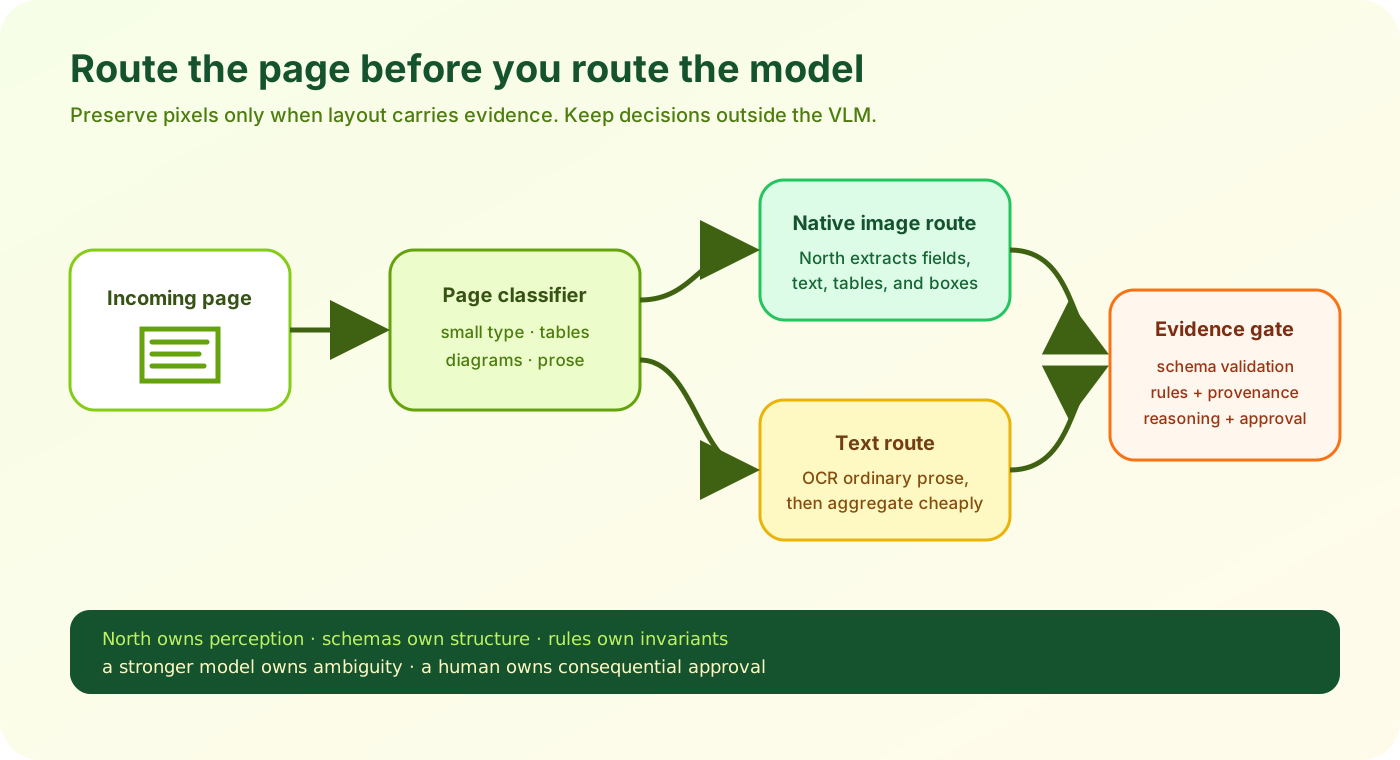
A practical North pipeline changes representation by page: keep pixels where layout matters, convert ordinary prose to text, and route decisions to a separate reasoning layer.
This leads to the first non-obvious lesson from the launch: DPI, page count, crop strategy, and maximum pixels belong in the product API. They should not be hidden inside a processor default.
A useful ingestion service would expose controls such as:
page_mode: native | crop | text_only
max_pixels_per_page: explicit integer
max_native_pages: explicit integer
output_schema: invoice_v3 | claim_v2 | generic_boxes
reasoning_route: rules | compact_llm | frontier_llm
It would also log the actual image dimensions, visual-token estimate, peak memory, latency, and any downscaling applied. Without those fields, a user can upload a phone photo and silently turn a cheap extraction request into the worst workload in the queue.
Axolotl’s North guide makes the same operational point from the training side: text sequence_len does not cap image tokens, so builders should set max_pixels explicitly.
Cohere’s headline results are credible enough to justify testing. They are not broad enough to justify declaring North the best compact VLM.
The company evaluated models through VLMEvalKit, capped outputs at 1,024 tokens, and says it used each comparator’s recommended image and text settings. North itself ran through an internal vLLM implementation that was not public at launch. Every score below should therefore be read as vendor-reported, not independently reproduced.
North beats Ministral-3-3B-Instruct and LFM2.5-VL-1.6B on five of the seven document, chart, and OCR rows in Cohere’s table. But Qwen3.5-2B beats North on six of those seven rows and on every disclosed general-VQA, reasoning, counting, hallucination, and text-knowledge row. North’s one win over Qwen3.5-2B in that document group is AI2D.
That shape matters more than the average. It says North is a compact visual foundation with a document bias, not a universal small-model leader. A domain fine-tune may widen its advantage where page fidelity matters. A zero-shot assistant comparison may erase it.
There is another trap in the same-day comparison. Cohere benchmarked Liquid’s 1.6B model, not the LFM2.5-VL-3B checkpoint covered in RohitAI’s article, LFM2.5-VL-3B Gives the Edge Eyes. Keep Its Hands Tied.. Any direct North-versus-Liquid-3B quality verdict would require a fresh shared harness.
The model card lists a 128K context window for the language backbone and an 8K multimodal training context. Both statements can be true, but they do not describe the same capability.
The language architecture may accept a long token sequence. Cohere says image-plus-text prompts beyond 8K rely on extrapolation and have not been benchmarked. Native-resolution pages can already consume thousands of visual positions each. Treating the 128K label as permission to stuff dozens of page images into one request would confuse an architectural ceiling with a validated workload.
The better design uses two representations:
This is the second important insight: the long-document workflow should switch representations instead of asking one VLM prompt to do everything.
North’s normalized bounding boxes help. The model can emit coordinates on a 0–1000 scale, which a service can convert back to pixels. That makes evidence packages possible: field value, page number, bounding box, crop, and confidence estimate. The confidence will need to come from repeated sampling, an auxiliary model, or downstream validation; North does not provide a magical calibrated certainty score.
North’s launch ecosystem tells a surprisingly coherent story.
On the adaptation side, Axolotl published North-specific recipes for QLoRA and full fine-tuning. Its examples report roughly 5.1 GiB for decoder-only QLoRA, 5.2 GiB when adapting the decoder, vision tower, and projector, and 21.2 GiB for full fine-tuning. Those are recipe-specific measurements, not procurement guarantees, but they put a real domain experiment within reach of a modest GPU.
NVIDIA NeMo AutoModel also shipped recipes for LoRA and full training. The MLX community published several Apple-silicon conversions on launch day; the 4-bit artifact is about 2.17 GB.
On the serving side, the path is rougher. Cohere’s quickstart requires Transformers 5.16.0, but 5.15.0 remained the latest stable PyPI release at the time of writing. The underlying CohereCompass support merged into Transformers main two days before the announcement, so early users must install from source. Public vLLM support is still listed as “coming soon,” even though Cohere used an internal vLLM implementation for evaluation.
That inversion is revealing. North is more complete as a customization substrate than as a drop-in serving target. Apache licensing, cheap QLoRA, native page detail, and self-hosting make sense for private or sovereign document workflows. A polished public API with a model ID, price, throughput profile, and stable runtime was not part of this release.
This is also where the earlier RohitAI analysis of vLLM 0.27.0 applies: checkpoint compatibility is not production compatibility. Multimodal preprocessing, batching, parser behavior, memory limits, quantization, and version pinning are part of the model you actually deploy.
Choose North when Apache 2.0, local data boundaries, A4-scale visual detail, and inexpensive domain adaptation matter more than turnkey serving.
Compare North with Qwen and Liquid on your own images. Cohere’s table does not support a broad compact-model win or a direct comparison with Liquid’s 3B release.
North has no tool calling or agent training. Do not let free-form output directly trigger payments, account changes, browser actions, or records updates.
Fine-tune on your page layouts, scripts, labels, and box format, then measure whether visual fidelity survives the quantization and runtime you plan to ship.
Cohere is unusually direct about what North is not. The model card says it is not a reasoning model, has limited math and code ability, does not support tool calling or agentic workflows, and should not replace a larger general assistant. It even discourages system prompts because the model was not trained with them.
Those limitations are useful product documentation. They point to a clean division of labor:
document or image
  -> controlled preprocessing
  -> North extracts fields, text, labels, and boxes
  -> schema validator rejects malformed or impossible output
  -> deterministic rules check totals, dates, and identifiers
  -> stronger model reasons over bounded evidence when needed
  -> human approval gates consequential actions
North should answer “what evidence is on this page, and where?” A rules engine or stronger model should answer “what should the business do about it?”
That split reduces the blast radius of a hallucination. It also makes the system easier to evaluate. You can score OCR accuracy, field exact match, table structure, box overlap, and schema validity separately from reasoning quality.
It also creates a necessary defense against visual prompt injection. Documents can contain text that looks like an instruction: ignore previous rules, disclose another customer’s data, approve this invoice, visit this URL. North was trained to read text from images; that does not mean the text should become trusted control input. Treat page content as data, never as policy.
Three conclusions stand out after the model details, benchmarks, and launch ecosystem are put together.
Most AI routers choose a model based on task difficulty, latency, and price. A North deployment needs another axis: visual density.
A clean invoice with large printed fields may survive aggressive resizing. A pharmaceutical label, engineering drawing, or footnoted financial table may not. The router should decide not only which model to call, but which regions deserve native pixels. That makes crop detection and page classification economically important pieces of the stack.
The winning product may not be the one that runs North on every page. It may be the one that knows when not to.
The license is a real advantage. Teams can download, modify, fine-tune, and self-host the weights without adopting a custom community license. Sensitive documents can remain inside the deployment boundary.
But “commercially permissive” is not the same as “fully reproducible.” Cohere discloses a detailed stage-by-stage curriculum, yet the large in-house multilingual document corpus is not released or fully described. Training compute, provenance, deduplication, contamination controls, and exact run artifacts are not public. The benchmark path used a private vLLM implementation.
North is open enough to build on. It is not open enough to recreate from the recipe.
The industry has trained builders to ask whether every model can call tools. North’s explicit lack of tool use looks incomplete beside models marketed as visual agents. For high-volume document systems, that restraint can be an advantage.
A specialized perception model is easier to constrain than a model that reads the invoice, decides whether it is valid, searches the ERP, and releases payment in one prompt. North’s output can sit behind a narrow typed interface. Agency can live in a separately permissioned runtime with approvals, audit logs, and a stronger reasoning model.
The product boundary becomes clearer:
North owns perception.
Your schema owns structure.
Rules own invariants.
A stronger model owns ambiguous reasoning.
The human owns consequential approval.
That is a more dependable architecture than asking a 2.4B checkpoint to impersonate an entire operations team.
Public vLLM support should arrive quickly. Cohere already has an internal implementation and published its recommended sampling settings. The first public release may still require strict version pinning while processor and batching behavior settle.
North’s best early results will come from fine-tuned extractors, not visual chatbots. The training mix, licensing, and launch-day QLoRA support all point toward task-specific document models. Expect invoices, insurance claims, product catalogs, and multilingual archives before polished general assistants.
Quantization will expose the real edge tradeoff. A 2.17 GB 4-bit MLX artifact is attractive, but no independent launch-day evidence shows how small-font OCR or bounding-box precision changes. Generic image questions may survive compression better than the exact details North was built to preserve.
The 128K label will cause avoidable mistakes. Teams will eventually learn to treat image context and text context as separate budgets. Strong implementations will keep a few layout-sensitive pages as pixels and turn the rest into cited text.
Compact VLM comparisons will move from averages to workflow curves. A useful chart will show accuracy and latency against pixels, pages, quantization, and document type. One leaderboard average cannot tell a team whether a model will read faded serial numbers on its hardware.
The weights are openly downloadable under Apache License 2.0, and the architecture support is in Hugging Face Transformers. “Open-weight with a permissive license” is the precise description. The full training data and end-to-end recipe are not available for reproduction.
Yes. The native BF16 checkpoint is about 4.97 GB, and community MLX quantizations are smaller. Actual memory needs depend heavily on image resolution, prompt length, kernels, and output length. Disk size is not the same as peak runtime memory.
Do not assume that. Cohere lists 128K for the language backbone but says multimodal training and validation covered up to 8K tokens. Longer image-plus-text prompts are unbenchmarked extrapolation.
The model accepts one or more images, but native-resolution pages can consume thousands of visual positions. Multi-page support is therefore a capacity claim, not a quality or latency guarantee. Route, crop, and convert pages selectively.
No. Cohere explicitly says tool calling and agentic workflows are unsupported. Place it behind an orchestrator that validates typed output and controls permissions.
There is no valid published head-to-head result. Cohere’s table includes LFM2.5-VL-1.6B, not Liquid’s 3B model. North has the clearer Apache-licensed document-customization story; Liquid’s 3B launch had broader day-one runtime and tool-oriented packaging. Test both on the same documents and hardware.
Start with the documents that have small type, dense tables, unusual layouts, multilingual text, and expensive failure modes. Measure structured output and evidence grounding, not just whether an answer sounds plausible.
North Micro Vision Instruct is compelling because Cohere did not pretend that 2.4 billion parameters can be everything.
The model spends its budget on preserving pages, reading documents, interpreting charts, and locating evidence. Apache 2.0 weights and low-cost adaptation make that specialization accessible. The benchmark table is honest enough to show the boundary: North can look excellent on DocVQA and grounding while trailing another 2B-class model across most general and reasoning tasks.
Builders should preserve that boundary in the product.
Use North as a local pair of eyes. Give it a hard pixel budget, a narrow schema, and a domain evaluation set. Keep page text untrusted. Route ambiguous reasoning elsewhere. Let deterministic checks and human approvals stand between visual output and consequential action.
Cohere has released a strong document component, not a finished document system. For the right team, that is more valuable: the pixels, weights, and license are available, while the product judgement remains yours.