Google LiteRT.js Makes Browser AI a Runtime Choice

For the last two years, browser AI has been pulled in two directions.
One path says the browser should call bigger cloud models and stay thin. The other says the browser should become a serious local inference surface. Google's LiteRT.js launch is a strong vote for the second path.
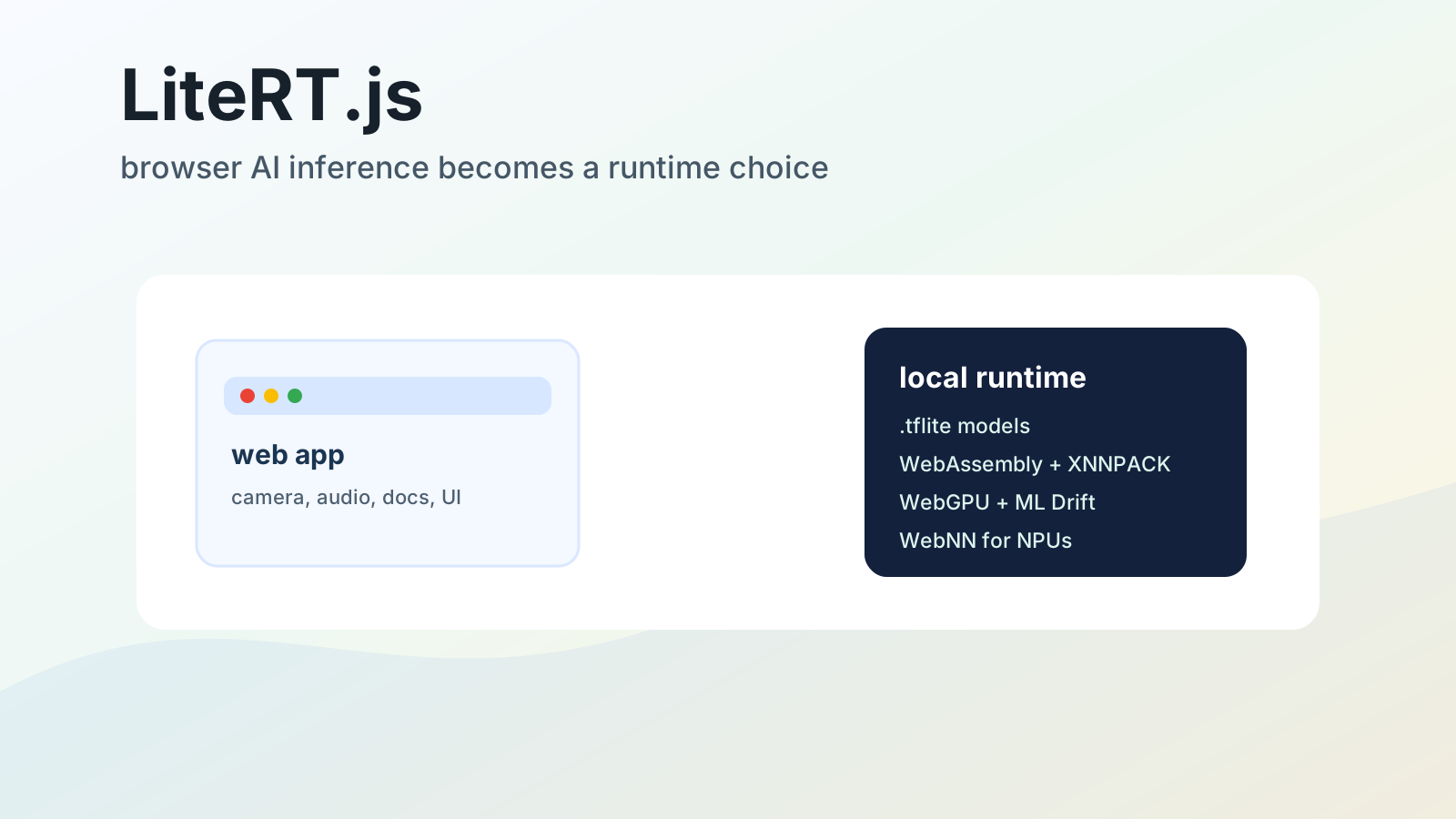
LiteRT.js is a JavaScript binding for Google's LiteRT runtime, built to run .tflite models directly inside web browsers. The headline numbers are good: Google says LiteRT.js can outperform existing web runtimes by up to 3x on tested classical vision and audio models, and that WebGPU or WebNN acceleration can deliver 5-60x speedups over CPU execution in demanding real-time cases. The release supports WebAssembly, XNNPACK on CPU, WebGPU through Google's ML Drift GPU path, and experimental WebNN support for NPUs.
Those facts matter, but the bigger shift is architectural.
LiteRT.js gives web developers a way to bring their own model to the browser, run it locally, keep raw user data on-device, avoid per-call server inference costs, and still use the same LiteRT deployment family that already spans Android, iOS, desktop, and edge devices. That changes the decision from "Should I call an API?" to "Which parts of this workflow belong on the user's machine?"
That is the interesting part. Google is not replacing frontier model APIs. It is making the browser a first-class edge runtime for the parts of AI that should be private, instant, cheap at scale, or continuously running.
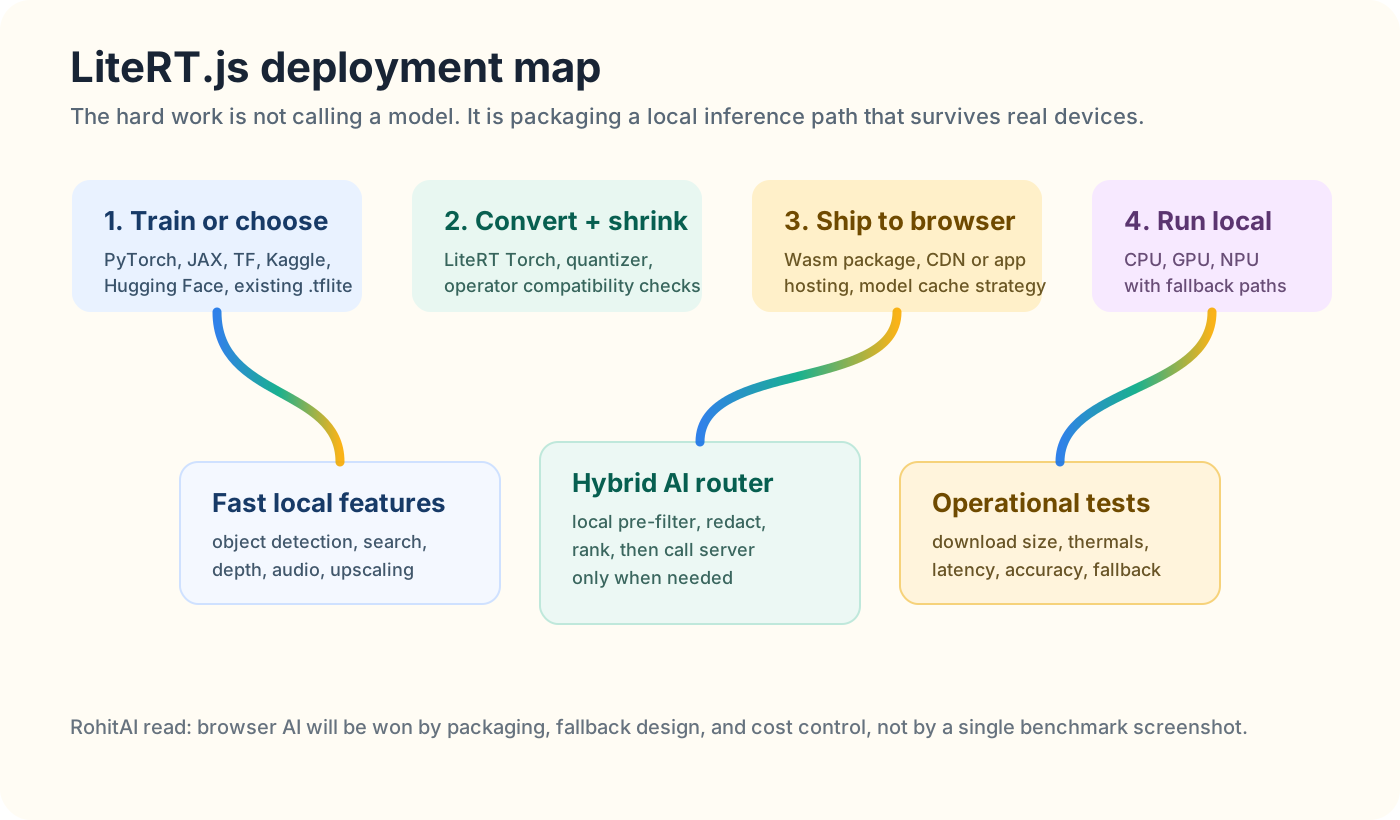
LiteRT.js matters because it gives web teams a practical local-inference path: convert, quantize, ship, run on CPU/GPU/NPU, and fall back when the user's device cannot carry the workload.
Google announced LiteRT.js on July 9, 2026 as a browser-side runtime for local AI inference. The release includes the @litertjs/core npm package, docs, demos, and integration guidance for existing TensorFlow.js pipelines.
The model format is important: LiteRT.js runs .tflite models. That makes it a natural fit for teams that already have TensorFlow Lite or LiteRT assets, and a new path for teams training in PyTorch, JAX, or TensorFlow and converting down into a web-deployable package.
Google's own launch frames the runtime around five practical pieces:
| Piece | What it does | Why builders should care |
|---|---|---|
| WebAssembly runtime | Brings LiteRT execution into the browser | Makes local inference work without native app installs |
| XNNPACK CPU path | Optimized CPU execution with multi-threading and SIMD support | Gives a dependable fallback when GPU/NPU acceleration is not available |
| WebGPU backend | Runs model workloads through browser-accessible GPU acceleration | Makes real-time vision, audio, image, and embedding tasks more plausible in web apps |
| WebNN path | Experimental route to dedicated NPUs and OS ML frameworks | Points toward lower-power local inference on modern hardware |
| TensorFlow.js interop | Lets TFJS pre/post-processing stay while the model execution moves to LiteRT.js | Reduces migration cost for existing browser ML apps |
The LiteRT.js docs also make the migration angle explicit: existing TensorFlow.js pipelines can keep TFJS pre-processing and post-processing while replacing the model execution stage with LiteRT.js. Google says the LiteRT path can go directly from PyTorch to LiteRT, while a PyTorch-to-TensorFlow.js path often goes through PyTorch, ONNX, TensorFlow, and then TensorFlow.js.
That is not glamorous, but it is exactly the kind of detail that decides whether a runtime gets used.
The lazy interpretation is that LiteRT.js is only for demos: object detection in the browser, webcam tricks, image filters, maybe a small embedding model.
That misses the product pattern.
The winning architecture for many AI apps will be hybrid. Small, fast, privacy-sensitive work happens locally. Expensive, deep, or high-stakes reasoning goes to a server model. LiteRT.js gives Google a stronger local half of that split.
A recruiting app can run local face-blurring, resume extraction, or document redaction before a server call. A medical portal can classify whether an uploaded image is readable before it leaves the device. A design tool can run segmentation, depth, upscaling, and object selection instantly while calling a cloud model only for final generation. A call-center dashboard can run local audio features, noise handling, or keyword extraction without streaming everything to a server.
That is the first non-obvious insight: LiteRT.js is not mainly a substitute for Gemini, GPT-5.6, or Claude. It is a way to spend fewer frontier tokens by doing the cheap, repetitive, sensitive work locally.
This connects to the broader agent-stack story I wrote about in GPT-5.6 GA Turns OpenAI's Agent Stack Into a Product. OpenAI is building a governed cloud-and-desktop work loop. Google, with LiteRT.js, is strengthening the other side of the map: the browser as an on-device inference layer.
Both strategies can coexist. In fact, the best products will probably use both.
Browser AI used to carry a stigma. It meant toy models, slow TensorFlow.js demos, WebGL workarounds, large downloads, and fragile performance across devices.
That picture is changing because the browser stack is improving in three places at once.
First, WebAssembly gives runtimes like LiteRT.js a portable way to ship serious native code into the browser sandbox.
Second, WebGPU gives JavaScript access to modern GPU compute. Google's LiteRT.js docs list WebGPU support across Chrome and Edge 113+, Safari 17.4+, and partial Firefox support, with a real GPU required for acceleration.
Third, WebNN is trying to expose operating-system ML acceleration and dedicated NPUs to web frameworks. The Chromium WebNN prototype summary describes the goal plainly: let JavaScript frameworks access native machine-learning APIs and hardware accelerators instead of repurposing lower-level graphics APIs for neural network execution.
Google is building into that curve.
LiteRT.js does not make every browser a high-end AI workstation. Google's own docs are careful about platform requirements. WebNN is still experimental, requires browser flags today, and depends on hardware, OS support, drivers, and JSPI configuration. Benchmarks can vary by GPU, thermals, browser driver, and model shape.
That caveat is not a weakness. It is the core product problem.
The browser is not one machine. It is millions of device classes pretending to be one platform.
A serious LiteRT.js deployment has to treat hardware as an input, not an assumption.
Local inference is not automatically better. It wins in specific places.
| Use case | Why local wins | What to watch |
|---|---|---|
| Real-time camera effects | Round trips to a server are too slow and too expensive for every frame | Battery, thermals, permission UX, GPU fallback |
| Private document pre-processing | Raw files can stay on-device until the app knows what must be sent | Model download size, local storage, browser memory |
| Search and embeddings for personal data | Local indexing can avoid uploading the user's private notes, photos, or browser state | Index persistence, quality drift, model updates |
| Audio cleanup or keyword spotting | Continuous streams can be processed cheaply without server metering | Mic permissions, background throttling, latency variance |
| Image upscaling and segmentation | Interactive tools need instant feedback and can batch locally | GPU memory, tiling, cross-browser differences |
| Offline or low-connectivity apps | Inference continues when the network disappears | Model caching, update policy, graceful degradation |
That is the second non-obvious insight: browser AI is strongest when inference is continuous, personal, or latency-sensitive.
If the user asks one hard reasoning question, a cloud model probably wins. If the app needs to run 30 inferences per second over webcam frames, the cloud loses quickly. If the app needs to inspect a confidential PDF before deciding whether to call a model, local inference is not just cheaper; it is a better privacy boundary.
This is where LiteRT.js feels more like infrastructure than a library.
It lets developers build the first stage of an AI workflow close to the user. That local stage can classify, redact, rank, segment, transcribe, embed, or validate. Then the app can call a frontier model only when the result is worth the cost and policy exposure.
TensorFlow.js has been the default mental model for browser ML for years. It is still useful, especially for pre-processing, post-processing, and existing JavaScript ML code. But model execution has always been painful when performance matters.
Google's LiteRT.js pitch is targeted at that exact pain.
The docs say LiteRT.js can work inside TensorFlow.js pipelines. Developers install @litertjs/core and @litertjs/tfjs-interop, keep TFJS tensors around the model, and use LiteRT.js for execution. That means teams do not have to rewrite their entire app. They can replace the slowest part.
The migration still has rough edges. The docs warn about reordered inputs, transposed layouts, renamed tensors, converter differences, fake-input testing, and the need to inspect input and output details. PyTorch conversion also has constraints: models need to be compatible with torch.export/exportable through TorchDynamo, and dynamic tensor dimensions can be a problem.
That is the third non-obvious insight: LiteRT.js does not remove model engineering from web AI. It moves the hard work earlier, into conversion, quantization, compatibility, and fallback testing.
This is good for production teams and disappointing for demo culture.
A demo can load a model and show a fast webcam effect. A product has to answer messier questions:
Those are not reasons to avoid LiteRT.js. They are the checklist for using it well.
Most teams should not ask "LiteRT.js or cloud API?" as a binary question. They should split the workflow.
| Workload stage | Best default | Reason |
|---|---|---|
| Raw camera/audio pre-processing | LiteRT.js local | Too frequent and latency-sensitive for server calls |
| Confidential file inspection | LiteRT.js local first | Avoid uploading data until policy and user intent are clear |
| Lightweight classification/routing | LiteRT.js or small server model | Choose based on volume, device quality, and update needs |
| Deep reasoning or synthesis | Cloud frontier model | Local models still struggle with complex long-form reasoning |
| Final user-facing answer | Cloud model or hybrid | Depends on quality bar, privacy requirement, and latency tolerance |
| Background monitoring | Local when the stream is personal, server when shared/team-wide | Ownership and data locality matter more than model preference |
This matrix will change as LiteRT-LM.js matures. Google's LiteRT-LM Web API is already in early preview for text-in/text-out browser LLMs through WebGPU, with web-compatible Gemma 4 E2B and E4B models listed today. That is separate from the LiteRT.js .tflite runtime, but the direction is the same: Google wants a web path for local AI that spans classical models and smaller language models.
Do not overread that. A local Gemma-class model in the browser is not a GPT-5.6 replacement. But it is enough for many small jobs: draft suggestions, local search, form cleanup, light classification, privacy-preserving first passes, or offline assistance.
The market impact is not that every model moves into the browser.
The impact is that server APIs stop being the default for every AI-shaped feature.
Google has several overlapping AI surfaces: Gemini APIs, Chrome built-in AI, Android on-device models, MediaPipe, LiteRT, Firebase, Cloud, and Workspace.
LiteRT.js gives Google a lower-level web runtime that complements, rather than duplicates, Chrome's built-in AI APIs. Chrome's built-in AI docs are aimed at web apps that want browser-provided capabilities like translation, summarization, writing, rewriting, and prompting with local models. That is convenient, but the developer does not fully own the model path.
LiteRT.js is different. It is bring-your-own-model infrastructure.
That distinction matters.
Chrome built-in AI is good when the feature fits Google's browser-provided model and API. LiteRT.js is better when the developer has a specific model, a specific data shape, a compliance reason, a visual/audio pipeline, or a need to ship the same model family across web, mobile, and desktop.
This is the fourth non-obvious insight: Google is building two layers of browser AI: high-level built-in intelligence for common tasks, and LiteRT.js for teams that need model ownership.
That is a smart split. It gives casual developers a simple API and gives serious product teams an escape hatch from browser-provided black boxes.
It also helps Google defend the web against native app platforms. If local AI only works well in native apps, web apps become second-class citizens for the next generation of camera, audio, document, and multimodal tools. LiteRT.js is part of Google's argument that the web can stay competitive.
Google's benchmark claims are directionally strong, but they should not be treated as a universal guarantee.
The launch post says tests were run on a 2024 MacBook Pro with M4 Apple Silicon in a controlled browser environment. Google also says performance can vary with local GPU capability, thermal throttling, and browser driver optimization. That is exactly right.
For production teams, the benchmark that matters is not the best case. It is the distribution.
Measure these five things before committing:
| Metric | Why it matters |
|---|---|
| p50 and p95 latency by device class | A feature that feels instant on an M4 Mac can feel broken on a low-end Chromebook |
| First-run download and compile time | Users judge the feature before the first inference finishes |
| Accuracy after quantization | Smaller models are cheaper to ship, but quality regressions may be domain-specific |
| Battery and thermal behavior | Continuous camera/audio inference can make a great demo unusable after 10 minutes |
| Fallback quality | Unsupported ops, missing accelerators, or browser differences should degrade gracefully |
Google's docs include a practical warning that unsupported ops on WebGPU and WebNN can fall back to CPU. That is helpful, but it also means developers need visibility. A silent fallback can turn a smooth GPU feature into a slow CPU feature without the product team realizing why.
Add telemetry. Detect accelerator choice. Log initialization time. Track model version. Track fallback rate. Track memory failures. Give users a way to disable heavy local AI features.
Local inference is private by default only if the app design respects the user. It is cheap by default only after the model is downloaded and the device can run it well. It is fast by default only on hardware that matches your expectations.
One of the strongest arguments for LiteRT.js is privacy. The launch post emphasizes that models can run entirely locally, which can keep raw user data out of server logs and reduce server inference costs.
That is real.
But local AI can still be creepy if product teams use it carelessly. A browser app that analyzes a user's camera, microphone, files, or personal notes locally still needs clear permissioning and honest UI. "It stays on your device" is not a license to make invisible inferences.
For example:
This is where browser AI will face the same trust test as cloud AI, just with different failure modes.
The cloud concern is data leaving the device. The local concern is software doing more analysis than the user expected.
Good products will make local inference legible.
If you already run AI in a web app, treat LiteRT.js as a targeted performance and privacy experiment, not a blanket rewrite.
The best LiteRT.js products will feel boring in a good way: instant, private, cheap to operate, and invisible until they need a stronger cloud model.
LiteRT.js will not make every web app an AI app. It will make a certain class of AI feature feel normal.
The first winners will be visual and audio tools: webcam effects, product recognition, document scanning, local embedding search, creative editors, browser extensions, accessibility features, call tools, and design apps. These are places where latency and privacy matter more than a giant model's reasoning depth.
The second wave will be hybrid agents. A web app will use LiteRT.js to watch, filter, redact, classify, embed, or extract locally. Then it will call Gemini, GPT-5.6, Claude, or another cloud model only for the expensive reasoning step. That architecture reduces cost, reduces data exposure, and makes AI features feel faster.
The third wave depends on WebNN and NPUs. If browser access to native ML hardware becomes stable, local AI stops being a clever optimization and becomes part of normal web app design. A future product manager may ask, "Why are we sending every frame to a server?" the way they now ask, "Why is this interaction not instant?"
LiteRT.js is a step toward that future.
The practical takeaway is simple: server models are still where the deepest reasoning lives. But the browser is becoming the place where AI can listen, see, pre-process, protect privacy, and decide whether the cloud is worth calling.
That makes LiteRT.js more important than a runtime announcement. It is Google pushing inference back to the edge of the web.
LiteRT.js is Google's JavaScript binding for LiteRT, designed to run .tflite machine-learning models directly inside web browsers using WebAssembly, CPU acceleration, WebGPU, and experimental WebNN support.
Not exactly. Google positions LiteRT.js as a high-performance model execution path that can integrate with TensorFlow.js pipelines. Teams can keep TFJS pre-processing and post-processing while moving model inference to LiteRT.js.
LiteRT.js focuses on .tflite model inference. Google's related LiteRT-LM Web API is the browser path for supported local language models, currently in early preview with limited web-compatible Gemma 4 models.
LiteRT.js supports CPU execution through XNNPACK, GPU acceleration through WebGPU and Google's ML Drift path, and experimental WebNN support for NPUs and native OS ML frameworks.
Use LiteRT.js when the work is latency-sensitive, continuous, private, offline-friendly, or high-volume enough that server inference cost becomes painful. Use cloud models for deep reasoning, broad knowledge, high-quality generation, and hard synthesis.
Test model conversion, quantization quality, first-run load time, accelerator availability, fallback behavior, memory usage, battery and thermal impact, and latency across realistic user devices.