OpenAI Codex Micro Puts the Agent Control Loop on Your Desk

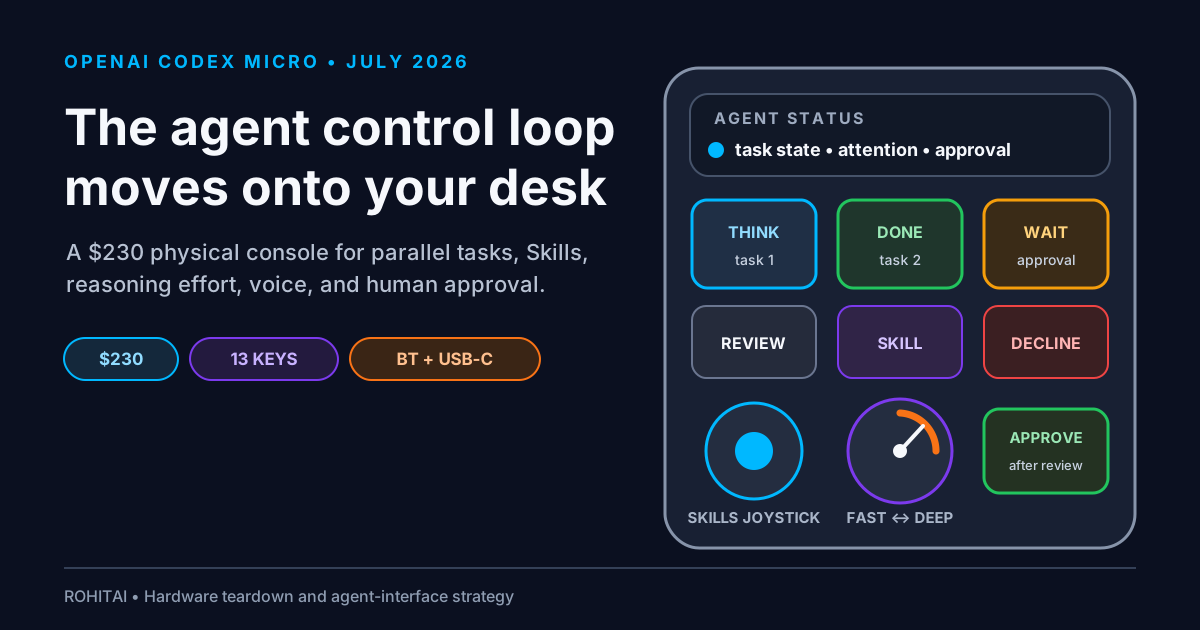
OpenAI's new hardware collaboration is a 13-key pad small enough to disappear beside a keyboard. That modest shape hides a much larger product bet.
Codex Micro is a $230, limited-run control surface made with Work Louder for the ChatGPT desktop app. Six illuminated keys follow Codex tasks. Other controls can approve or decline a request, start a new task, activate voice, trigger an enabled Skill, or change reasoning effort. It connects over Bluetooth or USB-C and is officially listed for Mac and Windows.
It is not a standalone AI computer. It contains no model, no display, and no microphone. It is not the separately reported consumer-device program involving Jony Ive. Strip away the Codex keycaps and it is recognizably based on Work Louder's existing Creator Micro platform.
Yet calling it “just a macro pad” misses the useful part. Shortcuts are cheap. A first-party live state feed for up to six tracked Codex tasks is not. The lights turn background work into a physical attention queue: blue is thinking, green is finished and unread, amber needs input, red signals an error. The user can glance down, decide where judgment is needed, and jump directly to that task.
That is the bigger shift. Microsoft's Copilot key was designed to summon one assistant. Codex Micro is designed to supervise several pieces of delegated work. AI hardware is moving from invocation to orchestration—and from helping a person type to helping a person decide what deserves attention.
OpenAI calls Codex Micro a “command center for agentic work.” The product is a collaboration with Canadian input-device company Work Louder, not a clean-sheet OpenAI computer.
The official listing specifies 13 mechanical switches, one touch sensor, one rotary encoder, one planar joystick, RGB lighting, Bluetooth, and USB-C. The case combines CNC polycarbonate and aluminum. Buyers can choose clicky or silent low-profile switches, and the package includes a USB-C cable plus a custom Codex icon-and-color keyset.
OpenAI lists Mac and Windows compatibility. Its setup documentation says the device works with the ChatGPT desktop app and can be configured from the Codex Micro settings screen. On macOS, ChatGPT needs Input Monitoring permission to react to the device's keypresses. Outside ChatGPT, Work Louder's Input software supplies general remapping and up to six layers.
The device requires a ChatGPT account with Codex desktop access. OpenAI has not published a Micro-specific plan or entitlement table, so buyers should not assume the accessory enables Codex on an otherwise ineligible account or managed workspace.
Several facts are conspicuously absent. Neither OpenAI nor the Codex-specific Work Louder page publishes the device's battery capacity, dimensions, or weight. The ordinary Creator Micro 2 Pro has published specifications, but copying those numbers to the collaboration unit would be an assumption. Official pages also do not clearly promise integration with the Codex CLI, IDE extension, or API. The documented native path is the ChatGPT desktop app.
The first wave of AI hardware mostly optimized invocation. Press a button, open an assistant, begin a conversation. Microsoft's Copilot key is the clearest example: a dedicated route into one software experience.
Codex Micro assumes the assistant is already working.
On June 2, 2026, OpenAI reported more than five million weekly active Codex users and said users were increasingly running multiple tasks in parallel. Our earlier Codex Remote guide framed that workflow as a queue of delegated jobs rather than one continuous coding session. Once work becomes asynchronous, the interface problem changes. Starting a task is easy; remembering six task states, spotting a request for input, and returning to the right thread become the friction.
The six frosted Agent Keys are a physical answer. By default, they follow the six most recently updated tasks. The user can instead choose pinned tasks, priority tasks, or custom assignments. One press switches to a task without pulling ChatGPT in front of the current app. Two presses within 350 milliseconds switch tasks and foreground ChatGPT. The selected key pulses.
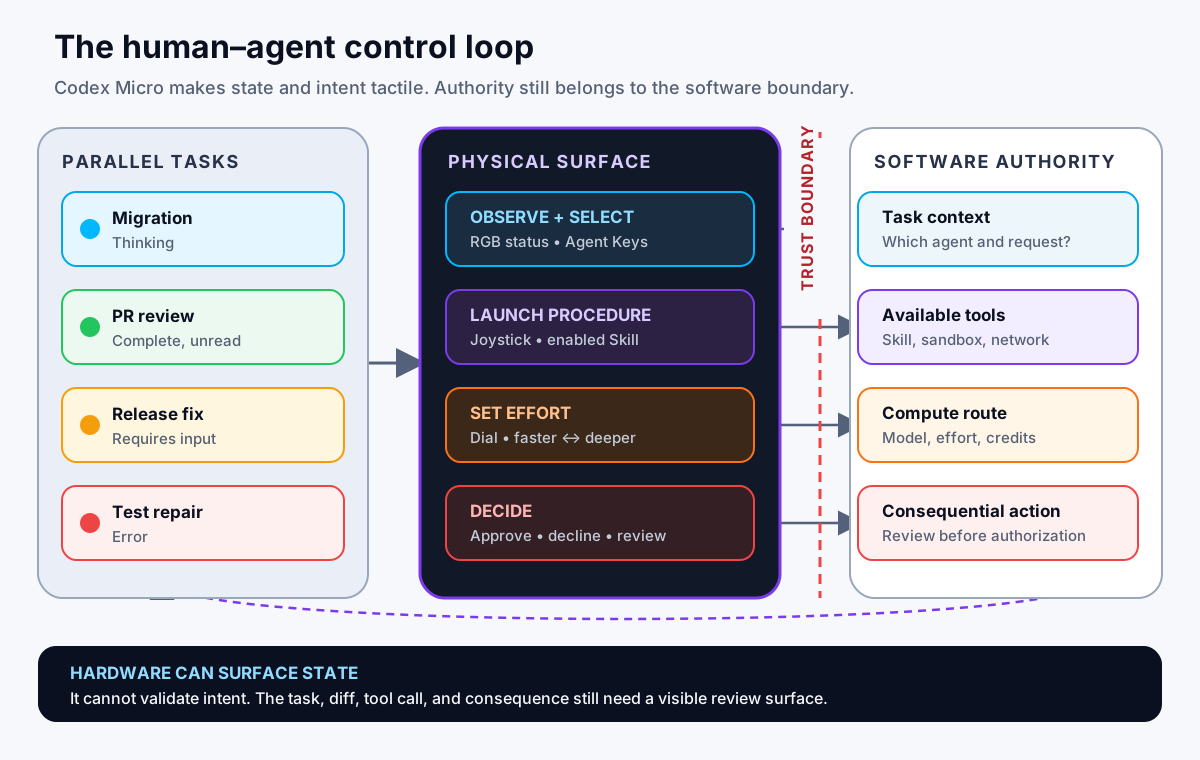
Codex Micro can make task state and user intent tactile. The software still owns context, permissions, tools, and consequential actions.
This is why the RGB system matters more than the novelty of a small keyboard. OpenAI documents a compact state language:
| Light | Codex state | Human response |
|---|---|---|
| White | Idle | No immediate attention required |
| Blue | Thinking | Let the task continue |
| Green | Complete and unread | Review the result when ready |
| Amber | Requires input | Read the request and respond |
| Red | Error | Inspect the failure before retrying |
| Off | No assigned task | Available slot |
That palette is not decoration. It is an interrupt scheduler. The pad lets a person ignore blue work, notice amber and red exceptions, and batch green reviews. The scarce resource in a parallel-agent workflow is no longer keystrokes. It is human attention allocated at the right moment.
The rest of the surface exposes three other parts of the control loop: procedure, compute, and authority.
Six live keys turn task progress into ambient information. A press moves to the selected task; a quick double press also brings ChatGPT forward.
Four directions can map to commands or enabled Skills—for example a review, debug, or refactor procedure—without navigating menus or remembering an invocation phrase.
The rotary control makes the speed-versus-depth choice tactile. That is useful, but it does not publish an exact price or credit cost for each position.
Dedicated controls reduce the time needed to answer an agent. They do not show the proposed command, diff, permission, or downstream consequence.
There are also practical command mappings. OpenAI documents defaults for Fast mode, approve, decline, continuing a task in a new task, push-to-talk, and sending the composer message. Configurable actions include opening a browser or terminal, reviewing changes, creating a Git commit or pull request, attaching files or photos, opening scheduled tasks, selecting reasoning effort, and invoking Skills.
The push-to-talk key deserves a correction that several quick launch summaries blur: Codex Micro has no microphone. It uses the computer's microphone. Press and hold to speak, or double-press within 350 milliseconds for hands-free recording.
Reasoning effort is normally buried in a model picker or settings menu. A dial turns it into a decision made at the moment of delegation.
That can improve behavior. A developer might choose lower effort for formatting a changelog, a middle setting for a bounded test repair, and deeper reasoning for an architectural migration. The physical motion reinforces a good operational habit: do not spend the same amount of inference on every task.
It also reveals where agent UX is heading. Our analysis of OpenAI's Codex rate card and shared agent-credit pool argued that model choice is becoming a capacity-allocation decision. Codex Micro brings a version of that choice to the user's hand.
But the dial should not be mistaken for a transparent cost meter. OpenAI says it adjusts reasoning effort; it does not document an exact mapping between each physical position and credits, dollars, model selection, latency, or token usage. The device gives the user a control, not a bill of materials for the resulting inference.
One button can approve a request. That is attractive when agents stop frequently for routine confirmations. It is also the most dangerous interaction on the device.
The key cannot display what is being approved. It cannot show a shell command, a diff, a destination, an access scope, or whether a change is reversible. The live Agent Key identifies a task state, but colored light is not sufficient context for authorization. Axios raised the same concern: a physical control can make accidental or reflexive approvals easier.
This does not mean a hardware approval button is inherently unsafe. It means friction is part of the safety design. The best approval flow is not the one with the fewest milliseconds; it is the one where the user can understand the action quickly enough to make a real decision.
The sensible setup is to reserve convenient physical approval for low-risk, reversible work. Keep high-impact actions behind visible review and additional confirmation. If the device encourages a muscle-memory “approve” reflex, remap that key to review changes instead.
The nearest hardware comparison is not a Stream Deck. It is Work Louder's own Creator Micro 2 Pro, which starts at $174. Codex Micro costs $230—$56 more, or roughly a 32% premium. The Framer Creator Micro Pro starts at $179 with branded icon caps, making the Codex edition $51 more on that same-tier comparison.
That premium buys Codex branding, the included icon keyset, direct configuration inside ChatGPT, and live task integration. It does not buy a fundamentally new class of controller.
General-purpose alternatives such as the Elgato Stream Deck+, Logitech MX Creative Console, and Keychron Q0 Max offer more keys, displays, broader plugin ecosystems, or open firmware for less money. Those alternatives do not currently offer Codex Micro's documented, first-party ChatGPT task-state integration, though custom integrations may be possible. The table separates public US list or MSRP prices from then-current sale prices where relevant; all can change.
| Device | Price | Interface | Best reason to buy | Main tradeoff |
|---|---|---|---|---|
| Codex Micro | $230 | 13 mechanical keys, joystick, dial, touch sensor, RGB | Native Codex task status and mappings | Narrow ecosystem; retail evidence pending |
| Creator Micro 2 Pro | From $174 | Same broad physical layout and six software layers | Custom general-purpose shortcuts | No documented first-party Codex task-state feed |
| Elgato Stream Deck+ | $199.99 MSRP; $179.99 listed July 16 | 8 LCD keys, 4 push encoders, touch strip | Broad plugins and visible labels | No documented native Codex task-state feed |
| Logitech MX Creative Console | $199.99 | 9 LCD keys plus separate dialpad | Multi-app creative workflows | Not designed around agent supervision |
| Keychron Q0 Max | From $119.99; $129.99 assembled | Wireless aluminum numpad with rotary control | Open-ended programmable input | No live agent status or Codex-native mapping |
One important distinction: Work Louder says the CM-2 platform uses its proprietary Input configurator rather than QMK/VIA. Codex Micro's general controls are currently programmable through Input, but buyers who want open firmware should not assume it behaves like a QMK device.
This is a workflow purchase, not a specification contest.
You live in the ChatGPT desktop app, keep several tasks running, switch among them frequently, and currently lose time checking which one needs attention.
You repeatedly trigger a few stable Skills, use push-to-talk, and value controls that remain reachable while another application stays in front.
If you run one task at a time, the software sidebar already provides most of the information. A cheaper programmable pad can handle generic shortcuts.
Official Codex compatibility is Mac and Windows. OpenAI documents Work Louder Input and does not document QMK/VIA support for Codex Micro. Do not buy on the hope of undocumented support.
The ideal buyer is not every developer. It is the person whose day already contains an agent fleet: one task reviewing a pull request, another repairing tests, a third writing migration notes, and a fourth waiting for a decision. For that user, a green or amber light in peripheral vision may be more valuable than another LCD shortcut grid.
Everyone else is paying collector-hardware pricing for a workflow they may not have.
At launch, OpenAI showed a $230 preorder with an estimated July 24, 2026 ship date. By July 16, the official listing showed “Out of stock.” The limited-run description does not promise a restock, and there is not yet enough independent retail-unit evidence to judge:
The last question matters most. Controller hardware can survive for years; an integration contract can disappear in one software release. Loupedeck ended hardware sales in 2025 while promising continued software support. Microsoft has also changed how its Copilot key behaves. Codex Micro's general controls are currently programmable through Work Louder Input, but its 32% premium over the Creator Micro 2 Pro depends on continued native Codex support.
The purchase terms also deserve attention. OpenAI Supply Co.'s FAQ says non-defective purchases are final sale, with no routine returns or exchanges. Work Louder handles hardware support and warranty. The $230 excludes shipping, duties, and taxes; international landed cost can be higher.
Codex Micro is unlikely to be important because of unit volume alone. RohitAI's read is that its value lies in making one possible agent-supervision model visible and testable.
Today the status feed drives six colored keys. Tomorrow the same semantics could drive a menu-bar utility, phone widget, watch complication, ambient display, team dashboard, or accessibility device.
OpenAI has documented a compact user-facing state vocabulary: thinking, complete, waiting, error, and selected. It has not announced a public Codex Micro protocol or hardware SDK. RohitAI's prediction is that the same semantics could eventually support a wider interface ecosystem.
Our OpenAI Skills analysis described Skills as portable workflow packages across ChatGPT, Codex, and the API. The joystick demonstrates the next step: a procedure can become a direction rather than a prompt.
That sounds trivial, but it changes adoption. A Skill that requires remembering a name competes with every other command. A Skill mapped to “joystick right” becomes muscle memory. The likely future is context-sensitive controls: the available procedures change with the repository, task state, permissions, or current application.
Building an entirely new consumer device requires industrial design, supply chains, radio certification, operating-system work, retail support, and a compelling reason to carry another computer. RohitAI's read is that using an established Work Louder platform gives OpenAI a relatively fast way to observe demand for physical agent controls and learn from customer feedback. It also reveals the other end of OpenAI's hardware strategy: our Jalapeño inference-chip analysis focused on the economics of machine compute, while Codex Micro focuses on the ergonomics of scarce human attention.
The collaboration can test:
That is why Codex Micro should not be confused with the Jony Ive hardware program. The limited run may reveal which status and action patterns users value, but OpenAI has not described it as a formal UX study or documented any special telemetry collection.
Codex exposes richer task-state controls in software, making the hardware language available beyond this limited run.
Skills and approvals become context-aware physical actions, with mappings changing by workspace and risk tier.
Effort controls gain cost and latency feedback; approval controls add stronger on-screen identity and consequence checks.
If you buy one, resist mapping every control immediately. Begin with observability, then add action.
Codex Micro is expensive if evaluated as a 13-key macro pad. Work Louder sells the nearby Creator Micro 2 Pro for $56 less, and mature general-purpose controllers offer displays and larger ecosystems around the same price.
It becomes more rational when evaluated as an attention device. For someone running several Codex tasks, six live state keys can remove a repeated cognitive tax: opening the app, scanning the queue, finding the interruption, and switching context. The joystick and dial then turn procedures and effort into muscle memory.
The approval control is the fault line. Agent products need faster human decisions, but the industry should not confuse faster authorization with better oversight. Codex Micro's own lack of a display makes that distinction impossible to ignore.
My verdict is simple: buy it for the native task-state feed, not for shortcuts. If live background status would change how you supervise Codex every day, the premium may be justified. If you want a general macro pad, an open controller, proven reliability, or a device that runs AI by itself, skip this limited run.
The lasting product idea is bigger than the object. Software agents are beginning to occupy enough of the workday that they need peripheral vision. Codex Micro is an early physical sketch of what that supervision layer could become.
Codex Micro is a limited-run, $230 physical control surface built by OpenAI and Work Louder for the ChatGPT desktop app. It provides live Codex task-status keys plus configurable command, Skill, voice, and reasoning-effort controls.
No. It does not run a model locally and has no display or microphone. It controls Codex in the ChatGPT desktop app and uses the computer's microphone for push-to-talk.
No. Codex Micro is a limited hardware collaboration based on Work Louder's established control-surface platform. It should not be confused with OpenAI's separate consumer-hardware program.
OpenAI lists it at $230 USD before shipping, duties, and taxes. Non-defective purchases are final sale under the OpenAI Supply Co. FAQ.
At launch, OpenAI's preorder page estimated July 24, 2026 shipping. By July 16, the official listing showed “Out of stock.” OpenAI describes the collaboration as limited-run and has not promised a restock.
It has six Agent Keys that can follow the six most recently updated tasks or use pinned, priority, or custom assignments. The documented lights distinguish idle, thinking, completed and unread, input-needed, error, and unassigned states.
Yes. OpenAI says each of the four joystick directions can map to a command or an enabled Skill. That fits the broader portable Skills model, but installing a Skill and granting its tools or permissions remain separate decisions.
It adjusts reasoning effort in Codex. OpenAI does not publish an exact credit, price, latency, or model mapping for each physical position, so it should not be treated as a precise cost meter.
Official Codex Micro compatibility is listed for Mac and Windows. Work Louder supports other platforms on some general products, but that does not establish native Codex integration on Linux, iOS, or Android.
It is better only for a narrow need: first-party live Codex task state and direct Codex mappings. A Stream Deck offers visible labels, a larger plugin ecosystem, and broader automation. Choose based on workflow, not key count.
It can be worth it for a heavy ChatGPT desktop user who supervises several Codex tasks every day and values ambient status, voice, Skills, and tactile controls. It is poor value for occasional or single-thread use, Linux-first workflows, open-firmware buyers, or anyone who wants independent reliability testing before purchasing.